使用示例
使用扩展配置初始化库
要使用扩展的启动配置初始化库:
- 初始化
AppMetricaConfiguration类的实例。 - 使用
AppMetricaConfiguration类的方法指定配置设置。 例如,启用日志记录或设置会话超时时间。 - 将
AppMetricaConfiguration实例传递给activate(with:)方法,该方法属于AppMetrica类。
扩展配置的参数从库初始化时开始生效。 在应用运行时配置库,请使用AppMetrica类的方法。
func application(_ application: UIApplication, didFinishLaunchingWithOptions launchOptions: [UIApplication.LaunchOptionsKey : AnyObject]? = nil) -> Bool {
    // Creating an extended library configuration.
    if let configuration = AppMetricaConfiguration(apiKey: "API key") {
        // Setting up the configuration. For example, to enable logging.
        configuration.areLogsEnabled = true
        // ...
        // Initializing the AppMetrica SDK.
        AppMetrica.activate(with: configuration)
    }
}
- 初始化
AMAAppMetricaConfiguration类的实例。 - 使用
AMAAppMetricaConfiguration类的方法指定配置设置。 例如,启用日志记录或设置会话超时。 - 将
AMAAppMetricaConfiguration实例传递给+activateWithConfiguration:方法,该方法属于AMAAppMetrica类。
扩展配置的参数从库初始化时开始生效。 在应用运行时配置库,请使用 AMAAppMetrica 类的方法。
- (BOOL)application:(UIApplication *)application didFinishLaunchingWithOptions:(NSDictionary *)launchOptions
{
    // Creating an extended library configuration.
    AMAAppMetricaConfiguration *configuration = [[AMAAppMetricaConfiguration alloc] initWithAPIKey:@"API key"];
    // Setting up the configuration. For example, to enable logging.
    configuration.logsEnabled = YES;
    // ...
    // Initializing the AppMetrica SDK.
    [AMAAppMetrica activateWithConfiguration:configuration];
    return YES;
}
什么是 API 密钥?
API 密钥是在AppMetrica网页界面进行应用注册时分配的唯一应用 ID。 你可以在 设置 → 主页 中找到它。
向额外的API密钥发送统计数据
将数据发送到额外的 API 密钥可以让您为这些 API 密钥收集自有统计数据。 你可以用这来控制其他用户对信息的访问权限。 例如,为了给分析师提供统计数据的访问权限,可以为额外的 API 密钥复制发送营销数据。 这样他们只会有访问所需信息的权限。
要将数据发送到额外的 API 密钥,必须使用报告器。 就像为主 API 密钥设置扩展启动配置一样,您可以为报告员设置扩展启动配置,发送事件、个人资料信息和应用内购买数据。 报告器可以在不初始化AppMetrica SDK的情况下工作。
步骤 1. (可选) 使用扩展配置初始化报告器
重要
具有扩展配置的报告器必须在首次调用报告器之前进行初始化。 否则,报告器将在没有配置的情况下初始化。
要使用扩展配置初始化报告器:
- 初始化
MutableReporterConfiguration类的实例。 - 使用
MutableReporterConfiguration类的方法指定配置设置。 例如,启用日志记录或设置会话超时。 - 将
MutableReporterConfiguration实例传递给activateReporter(with:)方法,属于AppMetrica类。 - 此配置用于具有指定 API 密钥的报告员。 您可以为每个额外的 API 密钥设置自己的配置。
// Creating an extended library configuration.
// To create it, pass an API key that is different from the app's API key.
if let reporterConfiguration = MutableReporterConfiguration(apiKey: "API key") {
    // Setting up the configuration. For example, to enable logging.
    reporterConfiguration.areLogsEnabled = true
    // ...
    // Initializing a reporter.
    AppMetrica.activateReporter(with: reporterConfiguration)
}
- 初始化
AMAMutableReporterConfiguration类的实例。 - 使用
AMAMutableReporterConfiguration类的方法指定配置设置。 例如,启用日志记录或设置会话超时时间。 - 将
AMAMutableReporterConfiguration实例传递给+activateReporterWithConfiguration:方法,该方法属于AMAAppMetrica类。 - 此配置用于具有指定 API 密钥的报告员。 您可以为每个额外的API密钥设置自己的配置。
// Creating an extended library configuration.
// To create it, pass an API key that is different from the app's API key.
AMAMutableReporterConfiguration *reporterConfiguration = [[AMAMutableReporterConfiguration alloc] initWithAPIKey:@"API key"];
// Setting up the configuration. For example, to enable logging.
reporterConfiguration.logsEnabled = YES;
// ...
// Initializing a reporter.
[AMAAppMetrica activateReporterWithConfiguration:[reporterConfiguration copy]];
什么是API密钥?
API 密钥是在AppMetrica网页界面进行应用注册时分配的唯一应用 ID。 你可以在 设置 → 主页 中找到它。
步骤 2. 配置使用报告器发送数据
要将统计数据发送到另一个 API 密钥:
-
使用
reporter(for:)方法获取AppMetrica类的实例,该实例实现AppMetricaReporting协议。如果报告器没有用扩展配置进行初始化,调用此方法将会为指定的API密钥初始化报告器。
-
使用
AppMetricaReporting协议的方法来发送事件和收入。 -
为了确保会话被正确跟踪,请为每个报告器设置发送会话开始和暂停事件。
guard let reporter = AppMetrica.reporter(for: "API key") else {
    print("REPORT ERROR: Failed to create AppMetrica reporter")
    return // or return someDefaultValue or throw someError
}
reporter.resumeSession()
// ...
reporter.reportEvent(name: "Updates installed", onFailure: { (error) in
    print("REPORT ERROR: %@", error.localizedDescription)
})
// ...
reporter.pauseSession()
-
使用
+reporterForAPIKey:方法(属于AMAAppMetrica类)来获取实现AMAAppMetricaReporting协议的实例。如果报告器没有用扩展配置进行初始化,调用此方法将会为指定的API密钥初始化报告器。
-
使用
AMAAppMetricaReporting协议的方法来发送事件和收入。 -
为了确保会话被正确跟踪,为每个报告器设置发送会话开始和暂停事件。
id<AMAAppMetricaReporting> reporter = [AMAAppMetrica reporterForAPIKey:@"API key"];
[reporter resumeSession];
// ...
[reporter reportEvent:@"Updates installed" onFailure:^(NSError *error) {
    NSLog(@"REPORT ERROR: %@", [error localizedDescription]);
}];
// ...
[reporter pauseSession];
什么是API密钥?
API 密钥是在AppMetrica网页界面进行应用注册时分配的唯一应用 ID。 你可以在 设置 → 主页 中找到它。
追踪应用崩溃
应用程序崩溃的报告默认会被发送。
要禁用自动跟踪,请将禁止发送崩溃报告的配置传递给崩溃模块。
要做到这一点,请为 false 设置 autoCrashTracking 属性,该属性属于 AppMetricaCrashesConfiguration 配置。
// Creating a crashes configuration.
let configuration = AppMetricaCrashesConfiguration()
// Disabling sending the information on crashes of the application.
configuration.autoCrashTracking = false
// Set the configuration for AppMetricaCrashes.
AppMetricaCrashes.crashes().setConfiguration(configuration)
要做到这一点,请为 NO 设置 autoCrashTracking 属性的 AMAAppMetricaCrashesConfiguration 配置。
// Creating a crashes configuration.
AMAAppMetricaCrashesConfiguration *configuration = [[AMAAppMetricaCrashesConfiguration alloc] init];
// Disabling sending the information on crashes of the application.
configuration.autoCrashTracking = NO;
// Set the configuration in AppMetricaCrashes.
[[AMAAppMetricaCrashes crashes] setConfiguration:configuration];
确定位置
AppMetrica 可以确定设备的位置。 位置精度取决于库用于初始化的配置:
-
With the
位置跟踪选项启用。 对于 iOS,该选项默认已启用。位置精确到城市。 您可以在报告中获取这些信息,也可以通过日志 API获取。
应用请求获取 GPS 权限。 电池消耗可能会增加。
-
With the
位置跟踪选项禁用。位置由 IP 地址确定,精确到国家。 您可以在报告中或通过Logs API获取此信息。
应用请求获取 GPS 权限。 电池消耗不会增加。
备注
如果您已启用 IP 地址掩码,AppMetrica 会根据未掩盖的 IP 地址部分,以国家级别的精度确定位置。
默认情况下,AppMetricaSDK 会启用 locationTracking 功能进行初始化,但不会请求获取位置数据的权限。 你应该使用 CLLocationManager 类的方法来实现这一功能。
要在禁用 locationTracking 的情况下初始化库,请将 locationTracking 属性设置为 AppMetricaConfiguration 配置的 false。
// Creating an extended library configuration.
if let configuration = AppMetricaConfiguration(apiKey: "API key") {
    // Disabling sending information about the location of the device.
    configuration.locationTracking = false
    // Initializing the AppMetrica SDK.
    AppMetrica.activate(with: configuration)
}
要在初始化库后禁用位置跟踪,请使用isLocationTrackingEnabled属性(属于AppMetrica类):
AppMetrica.isLocationTrackingEnabled = false
要将库初始化为禁用locationTracking,请将locationTracking属性设置为AMAAppMetricaConfiguration配置的NO。
// Creating an extended library configuration.
AMAAppMetricaConfiguration *configuration = [[AMAAppMetricaConfiguration alloc] initWithAPIKey:@"API key"];
// Disabling sending information about the device location.
configuration.locationTracking = NO;
// Initializing the AppMetrica SDK.
[AMAAppMetrica activateWithConfiguration:configuration];
要在初始化库后禁用locationTracking,请使用+setLocationTrackingEnabled:方法(AMAAppMetrica类):
AMAAppMetrica.locationTrackingEnabled = NO;
手动设置设备位置
在发送设备位置的自定义信息之前,请确保已启用报告功能。
默认情况下,设备位置由库自动检测。
要发送自定义设备位置,请将 CLLocation 实例传递到 customLocation 属性(AppMetrica``类)。
func locationManager(_ manager: CLLocationManager, didUpdateLocations locations: [CLLocation]) {
    AppMetrica.customLocation = locations.last
}
要通过启动配置发送自定义设备位置,请将 CLLocation 实例传递给 customLocation 属性,该属性位于 AppMetricaConfiguration 配置中。
// Creating an extended library configuration.
if let configuration = AppMetricaConfiguration(apiKey: "API key") {
  // Set a custom location.
  configuration.customLocation = CLLocation(latitude: 0, longitude: 0)
  // Initializing the AppMetrica SDK.
  AppMetrica.activate(with: configuration)
}
要发送自定义设备位置,请将 CLLocation 实例传递给 setCustomLocation 方法(AMAAppMetrica 类)。
- (void)locationManager:(CLLocationManager *)manager
    didUpdateToLocation:(CLLocation *)newLocation
           fromLocation:(CLLocation *)oldLocation
{
    AMAAppMetrica.customLocation = newLocation;
}
要通过启动配置发送自定义设备位置,请将 CLLocation 实例传递给 customLocation 属性,该属性位于 AMAAppMetricaConfiguration 配置中。
// Creating an extended library configuration.
AMAAppMetricaConfiguration *configuration = [[AMAAppMetricaConfiguration alloc] initWithAPIKey:@"API key"];
// Set a custom location.
configuration.customLocation = [[CLLocation alloc] initWithLatitude:0 longitude:0];
// Initializing the AppMetrica SDK.
[AMAAppMetrica activateWithConfiguration:configuration];
发送自定义事件
要发送自定义事件(不包含嵌套参数),请将以下参数传递给 reportEvent(name:onFailure:) 方法(属于 AppMetrica 类):
名称:事件的简短名称或描述。onFailure: 错误被传递到的块。 如果您不想跟踪错误,请为此块传递nil。
var message = "Updates installed"
AppMetrica.reportEvent(name: message, onFailure: { (error) in
    print("DID FAIL TO REPORT EVENT: %@", message)
    print("REPORT ERROR: %@", error.localizedDescription)
})
要发送自定义事件(不包含嵌套参数),请将以下参数传递给 +reportEvent:onFailure: 方法(属于 AMAAppMetrica 类):
消息:事件的简短名称或描述。onFailure: 错误被传递到的块。 如果不想跟踪错误,请为此块传递nil。
NSString *message = @"Updates installed";
[AMAAppMetrica reportEvent:message onFailure:^(NSError *error) {
    NSLog(@"DID FAIL REPORT EVENT: %@", message);
    NSLog(@"REPORT ERROR: %@", [error localizedDescription]);
}];
发送自定义事件并包含嵌套参数
要发送自定义事件(包含嵌套参数),请将以下参数传递给 reportEvent(name:parameters:onFailure:) 方法(属于 AppMetrica 类):
-
名称:事件的简短名称或描述。 -
参数:嵌套参数以键值对形式表示。网页界面AppMetrica显示事件最多五级嵌套。 如果事件有六级或更高级别,报告中只显示前五级。 您可以使用Reporting API导出最多十个级别。
-
onFailure:错误被传递到的块。 如果您不想跟踪错误,请为此块传递nil。
var message = "Updates installed"
let params = ["key1": "value1", "key2": "value2"]
AppMetrica.reportEvent(name: message, parameters: params, onFailure: { (error) in
    print("DID FAIL REPORT EVENT: %@", message)
    print("REPORT ERROR: %@", error.localizedDescription)
})
要发送自定义事件(包含嵌套参数),请将以下参数传递给 +reportEvent:parameters:onFailure: 方法(属于 AMAAppMetrica 类):
-
消息:事件的简短名称或描述。 -
参数:嵌套参数以键值对形式表示。网页界面AppMetrica显示事件最多五级嵌套。 如果事件有六级或更高级别,报告中只显示前五级。 您可以使用Reporting API导出最多十个级别。
-
onFailure: 错误被传递到的块。 如果您不想跟踪错误,请为此块传递nil。
NSString *message = @"Updates installed";
NSDictionary *params = @{@"key1": @"value1", @"key2": @"value2"};
[AMAAppMetrica reportEvent:message parameters:params onFailure:^(NSError *error) {
    NSLog(@"DID FAIL REPORT EVENT: %@", message);
    NSLog(@"REPORT ERROR: %@", [error localizedDescription]);
}];
要了解有关事件的更多信息,请查看事件。
从 WebView 的 JavaScript 代码发送事件
该 AppMetrica SDK 允许您从 JavaScript 代码发送客户端事件。 要做到这一点,你需要通过正在使用的依赖管理系统连接AppMetricaWebKit模块。
添加导入:
import AppMetricaWebKit
通过调用 setupWebViewReporting(with:onFailure:) 方法初始化发送:
let userController = WKUserContentController()
AppMetrica.setupWebViewReporting(with: JSController(userContentController:userController), onFailure: nil)
userController.add(myHandler, name: myScriptName)
let configuration = WKWebViewConfiguration()
configuration.userContentController = userController;
let webView = WKWebView(frame: .zero, configuration: configuration)
添加导入:
#import <AppMetricaWebKit/AppMetricaWebKit.h>
通过调用 +setupWebViewReporting:onFailure: 方法初始化发送:
WKUserContentController *userController = [[WKUserContentController alloc] init];
[AMAAppMetrica setupWebViewReporting:[[AMAJSController alloc] initWithUserContentController:userController] onFailure:nil];
[userController addScriptMessageHandler:myHandler name:myScriptName];
WKWebViewConfiguration *configuration = [[WKWebViewConfiguration alloc] init];
configuration.userContentController = userController;
WKWebView *webView = [[WKWebView alloc] initWithFrame:CGRectZero configuration:configuration];
在加载任何内容之前调用此方法。 我们建议在创建 webview 和向 WKUserContentController 添加脚本之前调用此方法。
要从 JavaScript 代码发送事件,请在 AppMetrica 接口中使用 reportEvent(name, value) 方法:
function buttonClicked() {
  AppMetrica.reportEvent('Button clicked!', '{}');
}
reportEvent 方法的参数:
名称: 一个字符串。 不能为null或为空。值:一个JSON字符串。 可以为null。
发送自定义错误消息
要发送错误消息,需要通过您使用的依赖管理系统连接AppMetricaCrashes模块。
要发送自定义错误消息,请添加导入:
import AppMetricaCrashes
然后使用 AppMetricaCrashes 类的方法和 AppMetricaCrashReporting 协议:
报告(error:onFailure:)报告(error:options:onFailure:)报告(nserror:onFailure:)报告(nserror:options:onFailure:)
要发送错误消息,可以使用标准的NSError类、简化的AppMetricaError类或ErrorRepresentable协议。
要发送自定义错误消息,请添加导入:
#import <AppMetricaCrashes/AppMetricaCrashes.h>
然后使用 AMAAppMetricaCrashes 类的方法和 AMAAppMetricaCrashReporting 协议:
-reportError:onFailure:-报告错误:选项:失败时:-reportNSError:onFailure:-reportNSError:options:onFailure:
要发送错误消息,可以使用标准的NSError类、简化的AMAError类或AMAErrorRepresentable协议。
带 NSError 的示例
如果错误使用 NSError 类发送,它们会按 domain 域和 code 错误代码进行分组。
let firstError = NSError(domain: "io.appmetrica.error-a", code: 12, userInfo: [
    BacktraceErrorKey: Thread.callStackReturnAddresses,
    NSLocalizedDescriptionKey: "Error A"
])
AppMetricaCrashes.crashes().report(nserror: firstError)
NSError *firstError = [NSError errorWithDomain:@"io.appmetrica.error-a"
                                          code:12
                                      userInfo:@{
                                           AMABacktraceErrorKey: NSThread.callStackReturnAddresses,
                                           NSLocalizedDescriptionKey: @"Error A"
                                      }];
[[AMAAppMetricaCrashes crashes] reportNSError:firstError onFailure:nil];
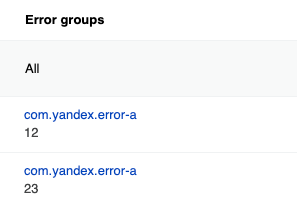
AppMetricaError 示例
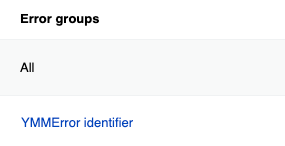
如果错误是通过 AppMetricaError 类或 ErrorRepresentable 协议发送的,它们会按照 identifier 分组。
let underlyingError = AppMetricaError(identifier: "Underlying AMAError")
let error = AppMetricaError(
    identifier: "AMAError identifier",
    message: "Another custom message",
    parameters: [
        "foo": "bar"
    ],
    backtrace: Thread.callStackReturnAddresses,
    underlyingError: underlyingError
)
AppMetricaCrashes.crashes().report(error: error)
如果错误使用 AMAError 类或 AMAErrorRepresentable 协议发送,它们会按照 identifier 分组。
AMAError *underlyingError = [AMAError errorWithIdentifier:@"Underlying AMAError"];
AMAError *error = [AMAError errorWithIdentifier:@"AMAError identifier"
                                        message:@"Another custom message"
                                     parameters:@{ @"foo": @"bar" }
                                      backtrace:NSThread.callStackReturnAddresses
                                underlyingError:underlyingError];
[[AMAAppMetricaCrashes crashes] reportError:error onFailure:nil];
不要使用变量值作为分组 ID。 否则,组的数量会增加,分析起来就会困难。
Sending ProfileId
如果您没有在 SDK 中配置ProfileId的发送,网页界面会显示appmetrica_device_id值。
要发送ProfileId,请使用userProfileID属性(属于AppMetrica类)。
AppMetrica.userProfileID = "id"
要发送ProfileId,请使用+setUserProfileID:方法(AMAAppMetrica类)。
AMAAppMetrica.userProfileID = @"id";
从缓冲区发送事件
AppMetrica SDK 不会在事件发生后立即发送事件。 库存放事件数据在缓冲区中。 The SendEventsBuffer 方法会启动从缓冲区发送数据并清空缓冲区。 使用该方法在用户场景的重要检查点之后强制发送已存储的事件。
AppMetrica.sendEventsBuffer()
[AMAAppMetrica sendEventsBuffer];
如果您经常使用此方法,可能会导致互联网流量和电力消耗增加。
发送用户属性
要发送个人属性,请将以下参数传递给 reportUserProfile(_:onFailure:) 方法,位于 AppMetrica 类:
userProfile:UserProfile实例,包含属性更新的数组。 个人属性是由ProfileAttribute类的方法创建的。onFailure: 错误被传递到的块。 如果您不想跟踪错误,请为此块传递nil。
let profile = MutableUserProfile()
// Updating a single user profile attribute.
let timeLeftAttribute = ProfileAttribute.customCounter("time_left")
profile.apply(timeLeftAttribute.withDelta(-4.42))
// Updating multiple attributes.
profile.apply(from: [
    // Updating predefined attributes.
    ProfileAttribute.name().withValue("John"),
    ProfileAttribute.gender().withValue(GenderType.male),
    ProfileAttribute.birthDate().withAge(24),
    ProfileAttribute.notificationsEnabled().withValue(false),
    // Updating custom attributes.
    ProfileAttribute.customString("born_in").withValueIfUndefined("Moscow"),
    ProfileAttribute.customString("address").withValueReset(),
    ProfileAttribute.customNumber("age").withValue(24),
    ProfileAttribute.customCounter("logins_count").withDelta(1),
    ProfileAttribute.customBool("has_premium").withValue(true)
])
// ProfieID is set using the method of the AppMetrica class.
AppMetrica.userProfileID = "id"

// Sending profile attributes.
AppMetrica.reportUserProfile(profile, onFailure: { (error) in
    print("REPORT ERROR: %@", error.localizedDescription)
})
要发送用户属性,请向 +reportUserProfile:onFailure: 方法(属于 AMAAppMetrica 类)传递以下参数:
用户配置文件:AMAUserProfile实例,包含属性更新数组。 要创建个人属性,请使用AMAProfileAttribute类的方法。onFailure: 错误被传递到的块。 如果您不想跟踪错误,请为此块传递nil。
AMAMutableUserProfile *profile = [[AMAMutableUserProfile alloc] init];
// Updating a single user profile attribute.
id<AMACustomCounterAttribute> timeLeftAttribute = [AMAProfileAttribute customCounter:@"time_left"];
[profile apply:[timeLeftAttribute withDelta:-4.42]];
// Updating multiple attributes.
[profile applyFromArray:@[
    // Updating predefined attributes.
    [[AMAProfileAttribute name] withValue:@"John"],
    [[AMAProfileAttribute gender] withValue:AMAGenderTypeMale],
    [[AMAProfileAttribute birthDate] withAge:24],
    [[AMAProfileAttribute notificationsEnabled] withValue:NO],
    // Updating custom attributes.
    [[AMAProfileAttribute customString:@"born_in"] withValueIfUndefined:@"Moscow"],
    [[AMAProfileAttribute customString:@"address"] withValueReset],
    [[AMAProfileAttribute customNumber:@"age"] withValue:24],
    [[AMAProfileAttribute customCounter:@"logins_count"] withDelta:1],
    [[AMAProfileAttribute customBool:@"has_premium"] withValue:YES]
]];
// ProfieID is set using the method of the AMAAppMetrica class.
[AMAAppMetrica setUserProfileID:@"id"];

// Sending profile attributes.
[AMAAppMetrica reportUserProfile:[profile copy] onFailure:^(NSError *error) {
    NSLog(@"Error: %@", error);
}];
发送用户个人资料属性(第一方数据)
第一方数据包括电话号码、电子邮箱地址和 Telegram 账户登录名。 在发送这些数据时,会使用 SHA-256 进行规范化和哈希处理,这意味着数据不会传输到服务器,也无法从已发送的哈希值中恢复。
// Creating the UserProfile instance.
let profile = MutableUserProfile()

profile.apply(from: [
  // Phone numbers
  ProfileAttribute.phoneHash()
  .withPhoneValues(["+0123456789", "+0123456789"]),

  // Emails
  ProfileAttribute.emailHash()
  .withEmailValues([
    "firstemailexample@appmetrica.io",
    "secondemailexample@appmetrica.io"
  ]),

  // Telegram login
  ProfileAttribute.telegramLoginHash()
  .withTelegramLoginValues(["john_doe", "john_d_alt"])
])

// Setting the UserProfile ID.
AppMetrica.userProfileID = "id"

// Sending the UserProfile instance.
AppMetrica.reportUserProfile(profile, onFailure: { (error) in
    print("REPORT ERROR: %@", error.localizedDescription)
})
// Creating the UserProfile instance.
AMAMutableUserProfile *profile = [[AMAMutableUserProfile alloc] init];

[profile applyFromArray:@[
  // Phone numbers
  [[AMAProfileAttribute phoneHash]
  withPhoneValues:@[@"+0123456789", @"+0123456789"]],

  // Emails
  [[AMAProfileAttribute emailHash]
  withEmailValues:@[
    @"firstemailexample@appmetrica.io",
    @"secondemailexample@appmetrica.io"
  ]],

  // Telegram login
  [[AMAProfileAttribute telegramLoginHash]
  withTelegramLoginValues:@[@"john_doe", @"john_d_alt"]],
]];

// Setting the UserProfile ID.
[AMAAppMetrica setUserProfileID:@"id"];

// Sending the UserProfile instance.
[AMAAppMetrica reportUserPro<file:[profile copy]>
onFailure:^(NSError *error) {
  NSLog(@"Error: %@", error);
}];
发送电子商务事件
AppMetrica 不允许将电商事件分为测试事件和非测试事件。 如果你使用主 API 密钥调试购买,测试事件会被包含在总体统计中。 因此,要调试电商事件发送,请使用报告器将统计数据发送到额外的API密钥。
步骤 1. 配置将电子商务事件发送到测试 API 密钥
对于不同的用户操作,存在相应的电商事件类型。 要创建特定事件类型,请使用适当的ECommerce类方法。
下面的示例展示了如何发送特定类型的事件:
打开页面
// Creating a screen object.
let screen = ECommerceScreen(
        name: "ProductCardScreen",
        categoryComponents: ["Promos", "Hot deal"],
        searchQuery: "danissimo maple syrup",
        payload: ["full_screen": "true"]
)
// Sending an e-commerce event.
if let reporter = AppMetrica.reporter(for: "Testing API key") {
   reporter.reportECommerce(.showScreenEvent(screen: screen))
}
// Creating a screen object.
AMAECommerceScreen *screen = [[AMAECommerceScreen alloc] initWithName:@"ProductCardScreen"
                                                   categoryComponents:@[ @"Promos", @"Hot deal" ]
                                                          searchQuery:@"danissimo maple syrup"
                                                              payload:@{ @"full_screen": @"true" }];
// Sending an e-commerce event.
id<AMAAppMetricaReporting> reporter = [AMAAppMetrica reporterForAPIKey:@"Testing API key"];
[reporter reportECommerce:[AMAECommerce showScreenEventWithScreen:screen] onFailure:nil];
查看产品卡片
// Creating a screen object.
let screen = ECommerceScreen(
        name: "ProductCardScreen",
        categoryComponents: ["Promos", "Hot deal"],
        searchQuery: "danissimo maple syrup",
        payload: ["full_screen": "true"]
)
// Creating an actualPrice object.
let actualPrice = ECommercePrice(
        fiat: .init(unit: "USD", value: .init(string: "4.53")),
        internalComponents: [
            .init(unit: "wood", value: .init(string: "30570000")),
            .init(unit: "iron", value: .init(string: "26.89")),
            .init(unit: "gold", value: .init(string: "5.1")),
        ]
)
// Creating a product object.
let product = ECommerceProduct(
        sku: "779213",
        name: "Danissimo curd product 5.9%, 130 g",
        categoryComponents: ["Groceries", "Dairy products", "Yogurts"],
        payload: ["full_screen": "true"],
        actualPrice: actualPrice,
        originalPrice: .init(
                fiat: .init(unit: "USD", value: .init(string: "5.78")),
                internalComponents: [
                    .init(unit: "wood", value: .init(string: "30590000")),
                    .init(unit: "iron", value: .init(string: "26.92")),
                    .init(unit: "gold", value: .init(string: "5.5")),
                ]
        ),
        promoCodes: ["BT79IYX", "UT5412EP"]
)
// Sending an e-commerce event.
if let reporter = AppMetrica.reporter(for: "Testing API key") {
   reporter.reportECommerce(.showProductCardEvent(product: product, screen: screen))
}
// Creating a screen object.
AMAECommerceScreen *screen = [[AMAECommerceScreen alloc] initWithName:@"ProductCardScreen"
                                                   categoryComponents:@[ @"Promos", @"Hot deal" ]
                                                          searchQuery:@"danissimo maple syrup"
                                                              payload:@{ @"full_screen": @"true" }];
// Creating an actualPrice object.
AMAECommerceAmount *actualFiat =
        [[AMAECommerceAmount alloc] initWithUnit:@"USD" value:[NSDecimalNumber decimalNumberWithString:@"4.53"]];
AMAECommerceAmount *woodActualPrice =
        [[AMAECommerceAmount alloc] initWithUnit:@"wood" value:[NSDecimalNumber decimalNumberWithString:@"30570000"]];
AMAECommerceAmount *ironActualPrice =
        [[AMAECommerceAmount alloc] initWithUnit:@"iron" value:[NSDecimalNumber decimalNumberWithString:@"26.89"]];
AMAECommerceAmount *goldActualPrice =
        [[AMAECommerceAmount alloc] initWithUnit:@"gold" value:[NSDecimalNumber decimalNumberWithString:@"5.1"]];
AMAECommercePrice *actualPrice = [[AMAECommercePrice alloc] initWithFiat:actualFiat
                                                      internalComponents:@[ woodActualPrice, ironActualPrice, goldActualPrice ]];
// Creating an originalPrice object.
AMAECommerceAmount *originalFiat =
        [[AMAECommerceAmount alloc] initWithUnit:@"USD" value:[NSDecimalNumber decimalNumberWithString:@"5.78"]];
AMAECommerceAmount *woodOriginalPrice =
         [[AMAECommerceAmount alloc] initWithUnit:@"wood" value:[NSDecimalNumber decimalNumberWithString:@"30590000"]];
AMAECommerceAmount *ironOriginalPrice =
        [[AMAECommerceAmount alloc] initWithUnit:@"iron" value:[NSDecimalNumber decimalNumberWithString:@"26.92"]];
AMAECommerceAmount *goldOriginalPrice =
        [[AMAECommerceAmount alloc] initWithUnit:@"gold" value:[NSDecimalNumber decimalNumberWithString:@"5.5"]];
AMAECommercePrice *originalPrice = [[AMAECommercePrice alloc] initWithFiat:originalFiat
                                                        internalComponents:@[ woodOriginalPrice, ironOriginalPrice, goldOriginalPrice ]];
// Creating a product object.
AMAECommerceProduct *product = [[AMAECommerceProduct alloc] initWithSKU:@"779213"
                                                                   name:@"Danissimo curd product 5.9%, 130 g"
                                                     categoryComponents:@[ @"Groceries", @"Dairy products", @"Yogurts" ]
                                                                payload:@{ @"full_screen" : @"true" }
                                                            actualPrice:actualPrice
                                                          originalPrice:originalPrice
                                                             promoCodes:@[ @"BT79IYX", @"UT5412EP" ]];
// Sending an e-commerce event.
id<AMAAppMetricaReporting> reporter = [AMAAppMetrica reporterForAPIKey:@"Testing API key"];
[reporter reportECommerce:[AMAECommerce showProductCardEventWithProduct:product screen:screen] onFailure:nil];
查看产品页面
// Creating a screen object.
let screen = ECommerceScreen(
        name: "ProductCardScreen",
        categoryComponents: ["Promos", "Hot deal"],
        searchQuery: "danissimo maple syrup",
        payload: ["full_screen": "true"]
)
// Creating an actualPrice object.
let actualPrice = ECommercePrice(
        fiat: .init(unit: "USD", value: .init(string: "4.53")),
        internalComponents: [
            .init(unit: "wood", value: .init(string: "30570000")),
            .init(unit: "iron", value: .init(string: "26.89")),
            .init(unit: "gold", value: .init(string: "5.1")),
        ]
)
// Creating a product object.
let product = ECommerceProduct(
        sku: "779213",
        name: "Danissimo curd product 5.9%, 130 g",
        categoryComponents: ["Groceries", "Dairy products", "Yogurts"],
        payload: ["full_screen": "true"],
        actualPrice: actualPrice,
        originalPrice: .init(
                fiat: .init(unit: "USD", value: .init(string: "5.78")),
                internalComponents: [
                    .init(unit: "wood", value: .init(string: "30590000")),
                    .init(unit: "iron", value: .init(string: "26.92")),
                    .init(unit: "gold", value: .init(string: "5.5")),
                ]
        ),
        promoCodes: ["BT79IYX", "UT5412EP"]
)
// Creating a referrer object.
let referrer = ECommerceReferrer(type: "button", identifier: "76890", screen: screen)
// Sending an e-commerce event.
if let reporter = AppMetrica.reporter(for: "Testing API key") {
   reporter.reportECommerce(.showProductDetailsEvent(product: product, referrer: referrer))
}
// Creating a screen object.
AMAECommerceScreen *screen = [[AMAECommerceScreen alloc] initWithName:@"ProductCardScreen"
                                                   categoryComponents:@[ @"Promos", @"Hot deal" ]
                                                          searchQuery:@"danissimo maple syrup"
                                                              payload:@{ @"full_screen": @"true" }];

// Creating an actualPrice object.
AMAECommerceAmount *actualFiat =
        [[AMAECommerceAmount alloc] initWithUnit:@"USD" value:[NSDecimalNumber decimalNumberWithString:@"4.53"]];
AMAECommerceAmount *woodActualPrice =
         [[AMAECommerceAmount alloc] initWithUnit:@"wood" value:[NSDecimalNumber decimalNumberWithString:@"30570000"]];
AMAECommerceAmount *ironActualPrice =
        [[AMAECommerceAmount alloc] initWithUnit:@"iron" value:[NSDecimalNumber decimalNumberWithString:@"26.89"]];
AMAECommerceAmount *goldActualPrice =
        [[AMAECommerceAmount alloc] initWithUnit:@"gold" value:[NSDecimalNumber decimalNumberWithString:@"5.1"]];
AMAECommercePrice *actualPrice = [[AMAECommercePrice alloc] initWithFiat:actualFiat
                                                      internalComponents:@[ woodActualPrice, ironActualPrice, goldActualPrice ]];
// Creating an originalPrice object.
AMAECommerceAmount *originalFiat =
        [[AMAECommerceAmount alloc] initWithUnit:@"USD" value:[NSDecimalNumber decimalNumberWithString:@"5.78"]];
AMAECommerceAmount *woodOriginalPrice =
        [[AMAECommerceAmount alloc] initWithUnit:@"wood" value:[NSDecimalNumber decimalNumberWithString:@"30590000"]];
AMAECommerceAmount *ironOriginalPrice =
        [[AMAECommerceAmount alloc] initWithUnit:@"iron" value:[NSDecimalNumber decimalNumberWithString:@"26.92"]];
AMAECommerceAmount *goldOriginalPrice =
        [[AMAECommerceAmount alloc] initWithUnit:@"gold" value:[NSDecimalNumber decimalNumberWithString:@"5.5"]];
AMAECommercePrice *originalPrice = [[AMAECommercePrice alloc] initWithFiat:originalFiat
                                                        internalComponents:@[ woodOriginalPrice, ironOriginalPrice, goldOriginalPrice ]];
// Creating a product object.
AMAECommerceProduct *product = [[AMAECommerceProduct alloc] initWithSKU:@"779213"
                                                                   name:@"Danissimo curd product 5.9%, 130 g"
                                                      categoryComponents:@[ @"Groceries", @"Dairy products", @"Yogurts" ]
                                                               payload:@{ @"full_screen" : @"true" }
                                                            actualPrice:actualPrice
                                                          originalPrice:originalPrice
                                                             promoCodes:@[ @"BT79IYX", @"UT5412EP" ]];
// Creating a referrer object.
AMAECommerceReferrer *referrer = [[AMAECommerceReferrer alloc] initWithType:@"button"
                                                                 identifier:@"76890"
                                                                     screen:screen];
// Sending an e-commerce event.
id<AMAAppMetricaReporting> reporter = [AMAAppMetrica reporterForAPIKey:@"Testing API key"];
[reporter reportECommerce:[AMAECommerce showProductDetailsEventWithProduct:product referrer:referrer] onFailure:nil];
将物品添加到购物车或从购物车中移除
// Creating a screen object.
let screen = ECommerceScreen(
        name: "ProductCardScreen",
        categoryComponents: ["Promos", "Hot deal"],
        searchQuery: "danissimo maple syrup",
        payload: ["full_screen": "true"]
)
// Creating an actualPrice object.
let actualPrice = ECommercePrice(
        fiat: .init(unit: "USD", value: .init(string: "4.53")),
        internalComponents: [
            .init(unit: "wood", value: .init(string: "30570000")),
            .init(unit: "iron", value: .init(string: "26.89")),
            .init(unit: "gold", value: .init(string: "5.1")),
        ]
)
// Creating a product object.
let product = ECommerceProduct(
        sku: "779213",
        name: "Danissimo curd product 5.9%, 130 g",
        categoryComponents: ["Groceries", "Dairy products", "Yogurts"],
        payload: ["full_screen": "true"],
        actualPrice: actualPrice,
        originalPrice: .init(
                fiat: .init(unit: "USD", value: .init(string: "5.78")),
                internalComponents: [
                    .init(unit: "wood", value: .init(string: "30590000")),
                    .init(unit: "iron", value: .init(string: "26.92")),
                    .init(unit: "gold", value: .init(string: "5.5")),
                ]
        ),
        promoCodes: ["BT79IYX", "UT5412EP"]
)
// Creating a referrer object.
let referrer = ECommerceReferrer(type: "button", identifier: "76890", screen: screen)
// Creating a cartItem object.
let addedItems = ECommerceCartItem(
        product: product,
        quantity: .init(string: "1"),
        revenue: actualPrice,
        referrer: referrer
)
// Sending an e-commerce event.
if let reporter = AppMetrica.reporter(for: "Testing API key") {
   reporter.reportECommerce(.addCartItemEvent(cartItem: addedItems))
   // Or:
   reporter.reportECommerce(.removeCartItemEvent(cartItem: addedItems))
}
// Creating a screen object.
AMAECommerceScreen *screen = [[AMAECommerceScreen alloc] initWithName:@"ProductCardScreen"
                                                   categoryComponents:@[ @"Promos", @"Hot deal" ]
                                                          searchQuery:@"danissimo maple syrup"
                                                              payload:@{ @"full_screen": @"true" }];
// Creating an actualPrice object.
AMAECommerceAmount *actualFiat =
        [[AMAECommerceAmount alloc] initWithUnit:@"USD" value:[NSDecimalNumber decimalNumberWithString:@"4.53"]];
AMAECommerceAmount *woodActualPrice =
        [[AMAECommerceAmount alloc] initWithUnit:@"wood" value:[NSDecimalNumber decimalNumberWithString:@"30570000"]];
AMAECommerceAmount *ironActualPrice =
        [[AMAECommerceAmount alloc] initWithUnit:@"iron" value:[NSDecimalNumber decimalNumberWithString:@"26.89"]];
AMAECommerceAmount *goldActualPrice =
        [[AMAECommerceAmount alloc] initWithUnit:@"gold" value:[NSDecimalNumber decimalNumberWithString:@"5.1"]];
AMAECommercePrice *actualPrice = [[AMAECommercePrice alloc] initWithFiat:actualFiat
                                                      internalComponents:@[ woodActualPrice, ironActualPrice, goldActualPrice ]];
// Creating an originalPrice object.
AMAECommerceAmount *originalFiat =
        [[AMAECommerceAmount alloc] initWithUnit:@"USD" value:[NSDecimalNumber decimalNumberWithString:@"5.78"]];
AMAECommerceAmount *woodOriginalPrice =
        [[AMAECommerceAmount alloc] initWithUnit:@"wood" value:[NSDecimalNumber decimalNumberWithString:@"30590000"]];
AMAECommerceAmount *ironOriginalPrice =
        [[AMAECommerceAmount alloc] initWithUnit:@"iron" value:[NSDecimalNumber decimalNumberWithString:@"26.92"]];
AMAECommerceAmount *goldOriginalPrice =
        [[AMAECommerceAmount alloc] initWithUnit:@"gold" value:[NSDecimalNumber decimalNumberWithString:@"5.5"]];
AMAECommercePrice *originalPrice = [[AMAECommercePrice alloc] initWithFiat:originalFiat
                                                        internalComponents:@[ woodOriginalPrice, ironOriginalPrice, goldOriginalPrice ]];
// Creating a product object.
AMAECommerceProduct *product = [[AMAECommerceProduct alloc] initWithSKU:@"779213"
                                                                   name:@"Danissimo curd product 5.9%, 130 g"
                                                     categoryComponents:@[ @"Groceries", @"Dairy products", @"Yogurts" ]
                                                                payload:@{ @"full_screen" : @"true" }
                                                            actualPrice:actualPrice
                                                          originalPrice:originalPrice
                                                             promoCodes:@[ @"BT79IYX", @"UT5412EP" ]];
// Creating a referrer object.
AMAECommerceReferrer *referrer = [[AMAECommerceReferrer alloc] initWithType:@"button"
                                                                 identifier:@"76890"
                                                                     screen:screen];
// Creating a cartItem object.
NSDecimalNumber *quantity = [NSDecimalNumber decimalNumberWithString:@"1"];
AMAECommerceCartItem *addedItems = [[AMAECommerceCartItem alloc] initWithProduct:product
                                                                        quantity:quantity
                                                                         revenue:actualPrice
                                                                        referrer:referrer];
// Sending an e-commerce event.
id<AMAAppMetricaReporting> reporter = [AMAAppMetrica reporterForAPIKey:@"Testing API key"];
[reporter reportECommerce:[AMAECommerce addCartItemEventWithItem:addedItems] onFailure:nil];
// Or:
[reporter reportECommerce:[AMAECommerce removeCartItemEventWithItem:addedItems] onFailure:nil];
开始并完成购买
// Creating a screen object.
let screen = ECommerceScreen(
        name: "ProductCardScreen",
        categoryComponents: ["Promos", "Hot deal"],
        searchQuery: "danissimo maple syrup",
        payload: ["full_screen": "true"]
)
// Creating an actualPrice object.
let actualPrice = ECommercePrice(
        fiat: .init(unit: "USD", value: .init(string: "4.53")),
        internalComponents: [
            .init(unit: "wood", value: .init(string: "30570000")),
            .init(unit: "iron", value: .init(string: "26.89")),
            .init(unit: "gold", value: .init(string: "5.1")),
        ]
)
// Creating a product object.
let product = ECommerceProduct(
        sku: "779213",
        name: "Danissimo curd product 5.9%, 130 g",
        categoryComponents: ["Groceries", "Dairy products", "Yogurts"],
        payload: ["full_screen": "true"],
        actualPrice: actualPrice,
        originalPrice: .init(
                fiat: .init(unit: "USD", value: .init(string: "5.78")),
                internalComponents: [
                    .init(unit: "wood", value: .init(string: "30590000")),
                    .init(unit: "iron", value: .init(string: "26.92")),
                    .init(unit: "gold", value: .init(string: "5.5")),
                ]
        ),
        promoCodes: ["BT79IYX", "UT5412EP"]
)
// Creating a referrer object.
let referrer = ECommerceReferrer(type: "button", identifier: "76890", screen: screen)
// Creating a cartItem object.
let addedItems = ECommerceCartItem(
        product: product,
        quantity: .init(string: "1"),
        revenue: actualPrice,
        referrer: referrer
)
// Creating an order object.
let order = ECommerceOrder(
        identifier: "88528768",
        cartItems: [addedItems],
        payload: ["black_friday": "true"]
)
// Sending an e-commerce event.
if let reporter = AppMetrica.reporter(for: "Testing API key") {
   reporter.reportECommerce(.beginCheckoutEvent(order:order))
   reporter.reportECommerce(.purchaseEvent(order: order))
}
// Creating a screen object.
AMAECommerceScreen *screen = [[AMAECommerceScreen alloc] initWithName:@"ProductCardScreen"
                                                   categoryComponents:@[ @"Promos", @"Hot deal" ]
                                                          searchQuery:@"danissimo maple syrup"
                                                              payload:@{ @"full_screen": @"true" }];
// Creating an actualPrice object.
AMAECommerceAmount *actualFiat =
        [[AMAECommerceAmount alloc] initWithUnit:@"USD" value:[NSDecimalNumber decimalNumberWithString:@"4.53"]];
AMAECommerceAmount *woodActualPrice =
        [[AMAECommerceAmount alloc] initWithUnit:@"wood" value:[NSDecimalNumber decimalNumberWithString:@"30570000"]];
AMAECommerceAmount *ironActualPrice =
        [[AMAECommerceAmount alloc] initWithUnit:@"iron" value:[NSDecimalNumber decimalNumberWithString:@"26.89"]];
AMAECommerceAmount *goldActualPrice =
        [[AMAECommerceAmount alloc] initWithUnit:@"gold" value:[NSDecimalNumber decimalNumberWithString:@"5.1"]];
AMAECommercePrice *actualPrice = [[AMAECommercePrice alloc] initWithFiat:actualFiat
                                                      internalComponents:@[ woodActualPrice, ironActualPrice, goldActualPrice ]];
// Creating an originalPrice object.
AMAECommerceAmount *originalFiat =
        [[AMAECommerceAmount alloc] initWithUnit:@"USD" value:[NSDecimalNumber decimalNumberWithString:@"5.78"]];
AMAECommerceAmount *woodOriginalPrice =
        [[AMAECommerceAmount alloc] initWithUnit:@"wood" value:[NSDecimalNumber decimalNumberWithString:@"30590000"]];
AMAECommerceAmount *ironOriginalPrice =
        [[AMAECommerceAmount alloc] initWithUnit:@"iron" value:[NSDecimalNumber decimalNumberWithString:@"26.92"]];
AMAECommerceAmount *goldOriginalPrice =
        [[AMAECommerceAmount alloc] initWithUnit:@"gold" value:[NSDecimalNumber decimalNumberWithString:@"5.5"]];
AMAECommercePrice *originalPrice = [[AMAECommercePrice alloc] initWithFiat:originalFiat
                                                        internalComponents:@[ woodOriginalPrice, ironOriginalPrice, goldOriginalPrice ]];
// Creating a product object.
AMAECommerceProduct *product = [[AMAECommerceProduct alloc] initWithSKU:@"779213"
                                                                   name:@"Danissimo curd product 5.9%, 130 g"
                                                     categoryComponents:@[ @"Groceries", @"Dairy products", @"Yogurts" ]
                                                                payload:@{ @"full_screen" : @"true" }
                                                            actualPrice:actualPrice
                                                          originalPrice:originalPrice
                                                             promoCodes:@[ @"BT79IYX", @"UT5412EP" ]];
// Creating a referrer object.
AMAECommerceReferrer *referrer = [[AMAECommerceReferrer alloc] initWithType:@"button"
                                                                 identifier:@"76890"
                                                                     screen:screen];
// Creating a cartItem object.
NSDecimalNumber *quantity = [NSDecimalNumber decimalNumberWithString:@"1"];
AMAECommerceCartItem *addedItems = [[AMAECommerceCartItem alloc] initWithProduct:product
                                                                        quantity:quantity
                                                                         revenue:actualPrice
                                                                        referrer:referrer];
// Creating an order object.
AMAECommerceOrder *order = [[AMAECommerceOrder alloc] initWithIdentifier:@"88528768"
                                                               cartItems:@[ addedItems ]
                                                                 payload:@{ @"black_friday" : @"true"}];
// Sending an e-commerce event.
id<AMAAppMetricaReporting> reporter = [AMAAppMetrica reporterForAPIKey:@"Testing API key"];
[reporter reportECommerce:[AMAECommerce beginCheckoutEventWithOrder:order] onFailure:nil];
[reporter reportECommerce:[AMAECommerce purchaseEventWithOrder:order] onFailure:nil];
步骤 2. 查看测试应用的报告
在应用中进行测试购买。 过一会儿,在 AppMetrica 界面检查电子商务报告。 确保报告显示电子商务事件。
要了解报告的更多信息,请查看电子商务。
步骤 3. 配置将事件发送到主 API 密钥
测试成功后,配置将电子商务事件发送到主 API 密钥。
要将ECommerce对象发送到主API密钥,请使用reportECommerce(_:onFailure:)方法,该方法属于AppMetrica类。
// ...
// Sending an e-commerce event.
AppMetrica.reportECommerce(.showScreenEvent(screen: screen))
要将 AMAECommerce 实例发送到主 API 密钥,请使用 +reportECommerce:onFailure: 方法,该方法属于 AMAAppMetrica 类。
// ...
// Sending an e-commerce event.
[AMAAppMetrica reportECommerce:[AMAECommerce showScreenEventWithScreen:screen] onFailure:nil];
发送收入
AppMetrica 支持使用 StoreKit 库实现的购买验证。 验证可以帮助你过滤来自被篡改应用的购买行为。 如果启用了验证且购买未通过验证,则此购买不会显示在报告中。
备注
要验证购买,请在设置中启用验证。
步骤 1. 测试发送收入
AppMetrica 不允许你区分测试收入和非测试收入。 如果使用主 API 密钥调试购买,测试购买会被包含在总体统计中。 因此,要调试收入发送,请使用报告器将统计数据发送到额外的 API 密钥。
此部分介绍将收入发送到额外 API 密钥的步骤:
带验证
要在 iOS 上验证购买,请配置发送 transactionID 字段和 receiptData,这是在您实现交易完成时需要的:
- 初始化
MutableRevenueInfo实例。 - 要验证购买,请指定
transactionID和receiptData. 您应该在调用SKPaymentQueue.default ().finishTransaction(transaction)之前收到它们。 - 将
MutableRevenueInfo实例发送到测试 API 密钥,使用AppMetricaReporting报告器。 要了解更多关于报告员的信息,请参见将统计数据发送到额外的API密钥。
 func completeTransaction(_ transaction: SKPaymentTransaction) {
     // ...
     let price = NSDecimalNumber(string: "2100.5")
     // Initializing the Revenue instance.
     let revenueInfo = MutableRevenueInfo(priceDecimal: price, currency: "BYN")
     revenueInfo.productID = "TV soundbar"
     revenueInfo.quantity = 2
     revenueInfo.payload = ["source": "AppStore"]
     // Set purchase information for validation.
     if let url = Bundle.main.appStoreReceiptURL, let data = try? Data(contentsOf: url), let transactionID = transaction.transactionIdentifier {
         revenueInfo.transactionID = transactionID
         revenueInfo.receiptData = data
     }
     // Sending the Revenue instance using reporter.
     guard let reporter = AppMetrica.reporter(for: "Testing API key") else {
        print("Failed to create AppMetrica reporter")
        return
     }
     reporter.reportRevenue(revenueInfo, onFailure: { (error) in
         print("Revenue error: \(error.localizedDescription)")
     })
     // Remove the transaction from the payment queue.
     SKPaymentQueue.default().finishTransaction(transaction)
}
- 初始化
AMAMutableRevenueInfo实例。 - 要验证购买,请指定
transactionID和receiptData. 必须在[[SKPaymentQueue defaultQueue] finishTransaction:transaction]被调用之前收到。 - 将
AMAMutableRevenueInfo实例发送到测试 API 密钥,使用AMAAppMetricaReporting报告器。 要了解更多关于报告员的信息,请参见将统计数据发送到额外的API密钥。
 - (void)completeTransaction:(SKPaymentTransaction *)transaction
 {
     // ...
     NSDecimalNumber *price = [NSDecimalNumber decimalNumberWithString:@"2100.5"];
     // Initializing the Revenue instance.
     AMAMutableRevenueInfo *revenueInfo = [[AMAMutableRevenueInfo alloc] initWithPriceDecimal:price currency:@"BYN"];
     revenueInfo.productID = @"TV soundbar";
     revenueInfo.quantity = 2;
     revenueInfo.payload = @{ @"source": @"AppStore" };
     // Set purchase information for validation.
     revenueInfo.transactionID = transaction.transactionIdentifier;
     revenueInfo.receiptData = [NSData dataWithContentsOfURL:[[NSBundle mainBundle] appStoreReceiptURL]];
     // Sending the Revenue instance using reporter.
     id<AMAAppMetricaReporting> reporter = [AMAAppMetrica reporterForAPIKey:@"Testing API key"];
     [reporter reportRevenue:[revenueInfo copy] onFailure:^(NSError *error) {
         NSLog(@"Revenue error: %@", error);
     }];
     // Remove the transaction from the payment queue.
     [[SKPaymentQueue defaultQueue] finishTransaction:transaction];
 }
不带验证
要在不进行验证的情况下发送购买信息:
-
初始化
MutableRevenueInfo实例。 -
(可选)要按
OrderID分组购买,请在payload属性中指定。备注
如果没有指定
OrderID,AppMetrica会自动生成ID。 -
将
MutableRevenueInfo实例发送到测试 API 密钥,使用AppMetricaReporting报告器。 要了解更多关于报告员的信息,请参见将统计数据发送到额外的API密钥。
 let price = NSDecimalNumber(string: "2100.5")
 // Initializing the Revenue instance.
 let revenueInfo = MutableRevenueInfo(priceDecimal: price, currency: "BYN")
 revenueInfo.productID = "TV soundbar"
 revenueInfo.quantity = 2
 // To group purchases, set the OrderID parameter in the payload property.
 revenueInfo.payload = ["OrderID": "Identifier", "source": "AppStore"]
 // Sending the Revenue instance using reporter.
 if let reporter = AppMetrica.reporter(for: "Testing API key") {
    reporter.reportRevenue(revenueInfo, onFailure: { (error) in
        print("Revenue error: \(error.localizedDescription)")
    })
 }
-
初始化
AMAMutableRevenueInfo实例。 -
(可选) 要按
OrderID分组购买,请在payload属性中指定。备注
如果没有指定
OrderID,AppMetrica会自动生成ID。 -
将
AMAMutableRevenueInfo实例发送到测试API密钥,使用AMAAppMetricaReporting报告器。 要了解更多关于报告者的信息,请参见将统计数据发送到额外的API密钥。
 NSDecimalNumber *price = [NSDecimalNumber decimalNumberWithString:@"2100.5"];
 // Initializing the Revenue instance.
 AMAMutableRevenueInfo *revenueInfo = [[AMAMutableRevenueInfo alloc] initWithPriceDecimal:price currency:@"BYN"];
 revenueInfo.productID = @"TV soundbar";
 revenueInfo.quantity = 2;
 // Setting the OrderID parameter in the payload property to group purchases
 revenueInfo.payload = @{ @"OrderID": @"Identifier", @"source": @"AppStore" };
 // Sending the Revenue instance using reporter.
 id<AMAAppMetricaReporting> reporter = [AMAAppMetrica reporterForAPIKey:@"Testing API key"];
 [reporter reportRevenue:[revenueInfo copy] onFailure:^(NSError *error) {
     NSLog(@"Revenue error: %@", error);
 }];
步骤 2. 配置将收益发送到主 API 密钥
测试成功后,配置将收入发送到主 API 密钥。
要将 MutableRevenueInfo 实例发送到主 API 密钥,请使用 reportRevenue(_:onFailure:) 方法,该方法属于 AppMetrica 类。
// ...
// Sending the Revenue instance.
AppMetrica.reportRevenue(revenueInfo, onFailure: { (error) in
    print("Revenue error: \(error)")
})
要将 AMAMutableRevenueInfo 实例发送到主 API 密钥,请使用 +reportRevenue:onFailure: 方法(属于 AMAAppMetrica 类)。
// ...
// Sending the Revenue instance.
[AMAAppMetrica reportRevenue:[revenueInfo copy] onFailure:^(NSError *error) {
   NSLog(@"Revenue error: %@", error);
}];
发送广告收入
步骤 1. 确保 SDK 已激活
激活示例:
let configuration = AppMetricaConfiguration.init(apiKey: "API key")
AppMetrica.activate(with: configuration!)
AMAAppMetricaConfiguration *configuration = [[AMAAppMetricaConfiguration alloc] initWithApiKey:@"API_key"];
[AMAAppMetrica activateWithConfiguration:configuration];
步骤 2. 设置广告收入数据发送
-
导入必要的模块:
Swift面向对象的 Cimport AppMetricaCore import AppLovinSDK#import <AppMetricaCore/AppMetricaCore.h> #import <AppLovinSDK/AppLovinSDK.h> -
为
MAAdFormat添加辅助扩展:Swift面向对象的 Cextension MAAdFormat { var appMetricaAdType: AdType { switch self { case .banner: return .banner case .interstitial: return .interstitial case .rewarded: return .rewarded case .native: return .native case .mrec: return .mrec case .appOpen: return .appOpen default: return .other } } }@implementation MAAdFormat (AppMetricaAdType) - (AMAAdType)appMetricaAdType { switch (self) { case MAAdFormat.banner: return AMAAdTypeBanner; case MAAdFormat.interstitial: return AMAAdTypeInterstitial; case MAAdFormat.rewarded: return AMAAdTypeRewarded; case MAAdFormat.native: return AMAAdTypeNative; case MAAdFormat.mrec: return AMAAdTypeMrec; case MAAdFormat.appOpen: return AMAAdTypeAppOpen; default: return AdTypeOther; } } @end -
Implement
MAAdRevenueDelegate:Swift面向对象的 Cclass AdRevenueReporter: NSObject, MAAdRevenueDelegate { func didPayRevenue(for ad: MAAd) { // Create a MutableAdRevenueInfo object let adRevenueInfo = MutableAdRevenueInfo(adRevenue: NSDecimalNumber(value: ad.revenue), currency: "USD") // Set additional properties adRevenueInfo.adType = ad.format.appMetricaAdType adRevenueInfo.adNetwork = ad.networkName adRevenueInfo.adUnitID = ad.adUnitIdentifier adRevenueInfo.adPlacementName = ad.placement adRevenueInfo.precision = ad.revenuePrecision // Additional information can be added to payload if needed adRevenueInfo.payload = [ "adType": ad.format.label, "countryCode": ALSdk.shared().configuration.countryCode, "networkPlacement": ad.networkPlacement, "original_ad_type": ad.format.label, ] // Report the ad revenue to AppMetrica AppMetrica.reportAdRevenue(adRevenueInfo) } }#import <AppMetricaCore/AppMetricaCore.h> #import <AppLovinSDK/AppLovinSDK.h>
-
导入必要的模块:
Swift面向对象的 Cimport AppMetricaCore import FairBidSDK#import <AppMetricaCore/AppMetricaCore.h> #import <FairBidSDK/FairBidSDK.h> -
创建一个函数,用于将广告收入数据传递到AppMetrica:
SwiftObjective‑Cfunc reportToAppMetrica(_ impressionData: FYBImpressionData, placementId: String, adType: AdType) { let revenue = impressionData.netPayout.map { NSDecimalNumber(decimal: $0.decimalValue) } ?? .zero let currency = impressionData.currency ?? "USD" let adRevenueInfo = MutableAdRevenueInfo(adRevenue: revenue, currency: currency) adRevenueInfo.adType = adType adRevenueInfo.adNetwork = impressionData.demandSource adRevenueInfo.adUnitID = impressionData.creativeId adRevenueInfo.precision = impressionData.priceAccuracy.appMetricaPrecision adRevenueInfo.payload = [ "original_ad_type": String(impressionData.placementType.rawValue), ] AppMetrica.reportAdRevenue(adRevenueInfo) { error in print("Failed to report ad revenue to AppMetrica: \(error)") } }void reportToAppMetrica(FYBImpressionData *impressionData, NSString *placementId, AdType adType) { NSDecimalNumber *revenue = impressionData.netPayout ? [[NSDecimalNumber alloc] initWithDecimal:impressionData.netPayout.decimalValue] : [NSDecimalNumber zero]; NSString *currency = impressionData.currency ? impressionData.currency : @"USD"; MutableAdRevenueInfo *adRevenueInfo = [[MutableAdRevenueInfo alloc] initWithAdRevenue:revenue currency:currency]; adRevenueInfo.adType = adType; adRevenueInfo.adNetwork = impressionData.demandSource; adRevenueInfo.adUnitID = impressionData.creativeId; adRevenueInfo.precision = [impressionData.priceAccuracy appMetricaPrecision]; adRevenueInfo.payload = @{ @"original_ad_type": @(impressionData.placementType) }; [AppMetrica reportAdRevenue:adRevenueInfo completion:^(NSError *error) { if (error) { NSLog(@"Failed to report ad revenue to AppMetrica: %@", error); } }]; } -
添加一个扩展,将 Fyber 价格转换为 AppMetrica 格式:
Swift面向对象的 Cextension FYBImpressionDataPriceAccuracy { var appMetricaPrecision: String { switch self { case .undisclosed: return "undisclosed" case .predicted: return "predicted" case .programmatic: return "programmatic" @unknown default: return "unknown" } } }@implementation NSNumber (FYBImpressionDataPriceAccuracyAppMetricaPrecision) + (NSString *)appMetricaPrecisionForFYBImpressionDataPriceAccuracy:(FYBImpressionDataPriceAccuracy)accuracy { switch (accuracy) { case FYBImpressionDataPriceAccuracyUndisclosed: return @"undisclosed"; case FYBImpressionDataPriceAccuracyPredicted: return @"predicted"; case FYBImpressionDataPriceAccuracyProgrammatic: return @"programmatic"; default: return @"unknown"; } } @end -
创建一个函数,用于将 Offerwall 展现报告发送到 AppMetrica:
SwiftObjective-Cfunc reportOfferWallShowToAppMetrica(placementId: String) { let adRevenueInfo = MutableAdRevenueInfo(adRevenue: NSDecimalNumber.zero, currency: "USD") adRevenueInfo.adType = .other adRevenueInfo.adUnitID = placementId adRevenueInfo.payload = [ "original_ad_type": "offerWall" ] AppMetrica.reportAdRevenue(adRevenueInfo) { error in print("Failed to report OfferWall show to AppMetrica: \(error)") } }- (void)reportOfferWallShowToAppMetricaWithPlacementId:(NSString *)placementId { AMAMutableAdRevenueInfo *adRevenueInfo = [[AMAMutableAdRevenueInfo alloc] initWithAdRevenue:[NSDecimalNumber zero] currency:@"USD"]; adRevenueInfo.adType = AMAAdTypeOther; adRevenueInfo.adUnitID = placementId; adRevenueInfo.payload = @{ @"original_ad_type": @"offerWall" }; [AMAYandexMetrica reportAdRevenueWithInfo:adRevenueInfo completionHandler:^(NSError * _Nullable error) { if (error) { NSLog(@"Failed to report OfferWall show to AppMetrica: %@", error); } }]; } -
为每个广告格式创建代表和对应的方法:
SwiftObjective-Cclass YourBannerDelegate: NSObject, FYBBannerDelegate { func bannerDidShow(_ banner: FYBBannerAdView, impressionData: FYBImpressionData) { reportToAppMetrica(impressionData, placementId: banner.options.placementId, adType: .banner) } // Implement other delegate methods as needed } class YourInterstitialDelegate: NSObject, FYBInterstitialDelegate { func interstitialDidShow(_ placementId: String, impressionData: FYBImpressionData) { reportToAppMetrica(impressionData, placementId: placementId, adType: .interstitial) } // Implement other delegate methods as needed } class YourRewardedDelegate: NSObject, FYBRewardedDelegate { func rewardedDidShow(_ placementId: String, impressionData: FYBImpressionData) { reportToAppMetrica(impressionData, placementId: placementId, adType: .rewarded) } // Implement other delegate methods as needed } class YourOfferWallDelegate: NSObject, OfferWallDelegate { func didShow(_ placementId: String?) { reportOfferWallShowToAppMetrica(placementId: placementId ?? "unknown") } // Implement other delegate methods as needed }// YourBannerDelegate @interface YourBannerDelegate : NSObject <FYBBannerDelegate> @end @implementation YourBannerDelegate - (void)bannerDidShow:(FYBBannerAdView *)banner impressionData:(FYBImpressionData *)impressionData { [self reportToAppMetricaWithImpressionData:impressionData placementId:banner.options.placementId adType:AdTypeBanner]; } // Implement other delegate methods as needed @end // YourInterstitialDelegate @interface YourInterstitialDelegate : NSObject <FYBInterstitialDelegate> @end @implementation YourInterstitialDelegate - (void)interstitialDidShowWithPlacementId:(NSString *)placementId impressionData:(FYBImpressionData *)impressionData { [self reportToAppMetricaWithImpressionData:impressionData placementId:placementId adType:AdTypeInterstitial]; } // Implement other delegate methods as needed @end // YourRewardedDelegate @interface YourRewardedDelegate : NSObject <FYBRewardedDelegate> @end @implementation YourRewardedDelegate - (void)rewardedDidShowWithPlacementId:(NSString *)placementId impressionData:(FYBImpressionData *)impressionData { [self reportToAppMetricaWithImpressionData:impressionData placementId:placementId adType:AdTypeRewarded]; } // Implement other delegate methods as needed @end // YourOfferWallDelegate @interface YourOfferWallDelegate : NSObject <OfferWallDelegate> @end @implementation YourOfferWallDelegate - (void)didShowWithPlacementId:(NSString *)placementId { // Assuming reportOfferWallShowToAppMetrica is implemented elsewhere [self reportOfferWallShowToAppMetricaWithPlacementId:placementId ? placementId : @"unknown"]; } // Implement other delegate methods as needed @end
-
导入必要的模块:
SwiftObjective-Cimport AppMetricaCore import GoogleMobileAds#import <AppMetricaCore/AppMetricaCore.h> #import <GoogleMobileAds/GoogleMobileAds.h> -
添加一个辅助扩展用于
GADAdValuePrecision:Swift面向对象的 Cextension GADAdValuePrecision: CustomStringConvertible { public var description: String { switch self { case .precise: return "precise" case .estimated: return "estimated" case .publisherProvided: return "publisher_defined" case .unknown: fallthrough @unknown default: return "unknown" } } } enum GAAdType: String { case banner = "bannerAd" case interstitial = "interstitialAd" case rewarded = "rewardedAd" case native = "nativeAd" case appOpen = "appOpenAd" }@interface GADAdValuePrecisionHelper : NSObject + (NSString *)stringFromAdValuePrecision:(GADAdValuePrecision)precision; @end @implementation GADAdValuePrecisionHelper + (NSString *)stringFromAdValuePrecision:(GADAdValuePrecision)precision { switch (precision) { case GADAdValuePrecisionPrecise: return @"precise"; case GADAdValuePrecisionEstimated: return @"estimated"; case GADAdValuePrecisionPublisherProvided: return @"publisher_defined"; case GADAdValuePrecisionUnknown: default: return @"unknown"; } } @end typedef NSString *GAAdType NS_TYPED_ENUM; GAAdType GAAdTypeBanner = @"bannerAd"; GAAdType GAAdTypeInterstitial = @"interstitialAd"; GAAdType GAAdTypeRewarded = @"rewardedAd"; GAAdType GAAdTypeNative = @"nativeAd"; GAAdType GAAdTypeAppOpen = @"appOpen"; -
实现广告加载逻辑并生成展现报告:
Swift面向对象的 Cclass ViewController: UIViewController, GADFullScreenContentDelegate { var rewardedAd: GADRewardedAd? func requestRewardedAd() { let originalType: GAAdType = .rewarded let adType: AdType = .rewarded GADRewardedAd.load( withAdUnitID: "AD_UNIT_ID", request: GADRequest() ) { [weak self] (ad, error) in if let error = error { print("Rewarded ad failed to load with error: \(error.localizedDescription)") return } if let ad = ad { self?.rewardedAd = ad self?.rewardedAd?.paidEventHandler = { adValue in // Extract the impression-level ad revenue data let value = adValue.value let precision = adValue.precision let currencyCode = adValue.currencyCode // Get the ad unit ID let adUnitId = ad.adUnitID // Get additional response info let responseInfo = ad.responseInfo let loadedAdNetworkResponseInfo = responseInfo.loadedAdNetworkResponseInfo let adSourceId = loadedAdNetworkResponseInfo?.adSourceID let adSourceInstanceId = loadedAdNetworkResponseInfo?.adSourceInstanceID let adSourceInstanceName = loadedAdNetworkResponseInfo?.adSourceInstanceName let adSourceName = loadedAdNetworkResponseInfo?.adSourceName let mediationGroupName = responseInfo.extrasDictionary["mediation_group_name"] as? String let mediationABTestName = responseInfo.extrasDictionary["mediation_ab_test_name"] as? String let mediationABTestVariant = responseInfo.extrasDictionary["mediation_ab_test_variant"] as? String // Create AdRevenueInfo object let adRevenueInfo = MutableAdRevenueInfo(adRevenue: value, currency: currencyCode) adRevenueInfo.adType = adType adRevenueInfo.adNetwork = adSourceName ?? "AdMob" adRevenueInfo.adUnitID = adUnitId adRevenueInfo.adPlacementID = adSourceId adRevenueInfo.precision = precision.description // Create payload with additional information var payload: [String: String] = [ "original_ad_type": originalType.rawValue ] if let adSourceInstanceId = adSourceInstanceId { payload["ad_source_instance_id"] = adSourceInstanceId } if let adSourceInstanceName = adSourceInstanceName { payload["ad_source_instance_name"] = adSourceInstanceName } if let mediationGroupName = mediationGroupName { payload["mediation_group_name"] = mediationGroupName } if let mediationABTestName = mediationABTestName { payload["mediation_ab_test_name"] = mediationABTestName } if let mediationABTestVariant = mediationABTestVariant { payload["mediation_ab_test_variant"] = mediationABTestVariant } adRevenueInfo.payload = payload // Report to AppMetrica AppMetrica.reportAdRevenue(adRevenueInfo) { error in print("Failed to report ad revenue: \(error)") } } } } } }@interface ViewController : UIViewController <GADFullScreenContentDelegate> @property (nonatomic, strong) GADRewardedAd *rewardedAd; @end @implementation ViewController - (void)requestRewardedAd { GAAdType originalType = GAAdTypeRewarded; AMAAdType adType = AMAAdTypeRewarded; [GADRewardedAd loadWithAdUnitID:@"AD_UNIT_ID" request:[GADRequest request] completionHandler:^(GADRewardedAd * _Nullable rewardedAd, NSError * _Nullable error) { if (error) { NSLog(@"Rewarded ad failed to load with error: %@", [error localizedDescription]); return; } self.rewardedAd = rewardedAd; __weak typeof(self) weakSelf = self; // Avoid strong reference cycles self.rewardedAd.paidEventHandler = ^(GADAdValue *adValue) { // Extract the impression-level ad revenue data NSDecimalNumber *value = adValue.value; GADAdValuePrecision precision = adValue.precision; NSString *currencyCode = adValue.currencyCode; // Get the ad unit ID NSString *adUnitId = weakSelf.rewardedAd.adUnitID; // Create AdRevenueInfo object AMAMutableAdRevenueInfo *adRevenueInfo = [[AMAMutableAdRevenueInfo alloc] initWithAdRevenue:value.doubleValue currency:currencyCode]; adRevenueInfo.adType = adType; adRevenueInfo.adNetwork = @"AdMob"; adRevenueInfo.adUnitID = adUnitId; adRevenueInfo.precision = [NSString stringWithFormat:@"%ld", (long)precision]; adRevenueInfo.payload = @{ @"original_ad_type": originalType }; // Report to AppMetrica [AMAYandexMetrica reportAdRevenue:adRevenueInfo onFailure:^(NSError *error) { NSLog(@"Failed to report ad revenue: %@", error); }]; }; }]; } @end
调整实现以支持其他广告格式
-
将
GADRewardedAd替换为适当的类:- Banner:
GADBannerView - Interstitial:
GADInterstitialAd - Native:
GADNativeAd - AppOpen:
GADAppOpenAd
- Banner:
-
修改
originalType和adType参数在requestRewardedAd方法中:SwiftObjective-C// For banner ads let originalType: GAAdType = .banner let adType: AdType = .banner // For interstitial and rewarded interstitial ads let originalType: GAAdType = .interstitial let adType: AdType = .interstitial // For native ads let originalType: GAAdType = .native let adType: AdType = .native // For rewarded ads (current example) let originalType: GAAdType = .native let adType: AdType = .rewarded // For app open ads let originalType: GAAdType = .appOpen let adType: AdType = .appOpen// For banner ads GAAdType originalType = GAAdTypeBanner; AMAAdType adType = AMAAdTypeBanner; // For interstitial and rewarded interstitial ads GAAdType originalType = GAAdTypeInterstitial; AMAAdType adType = AMAAdTypeInterstitial; // For native ads GAAdType originalType = GAAdTypeNative; AMAAdType adType = AMAAdTypeNative; // For rewarded ads (current example) GAAdType originalType = GAAdTypeRewarded; AMAAdType adType = AMAAdTypeRewarded; // For app open ads GAAdType originalType = GAAdTypeAppOpen; AMAAdType adType = AMAAdTypeOther; -
在每个格式的广告加载过程中适当阶段配置
paidEventHandler。 处理程序的实现本身保持不变。 -
对于广告横幅,直接将
paidEventHandler添加到GADBannerView实例中:SwiftObjective-CbannerView.paidEventHandler = { adValue in // Use the same implementation as in the rewarded ad example }bannerView.paidEventHandler = ^(GADAdValue *adValue) { // Use the same implementation as in the rewarded ad example }; -
对于中断广告、带奖励的中断广告和原生广告,请将
paidEventHandler添加到广告加载完成处理程序中,如带奖励广告的示例所示。
备注
不要忘了将 AD_UNIT_ID 替换为您实际使用的每种广告格式的 AdMob 广告单元 ID。
来自 ironSource SDK 的广告收入数据通过 AppMetricaIronSourceAdapter 传递到 AppMetrica:
-
适配器可通过 CocoaPods 获取。 将以下行添加到你的
Podfile:pod 'AppMetricaIronSourceAdapter' -
必须在激活 ironSource 之前初始化适配器。
-
AppMetrica 仅应在应用生命周期中激活一次。 不管是在初始化适配器之前还是之后做,都没有关系。
-
导入所需的模块:
SwiftObjective-Cimport AppMetricaCore import AppMetricaIronSourceAdapter import IronSource#import <AppMetricaCore/AppMetricaCore.h> #import <AppMetricaIronSourceAdapter/AppMetricaIronSourceAdapter.h> import <IronSource/IronSource.h> -
在激活 ironSource 之前,初始化
AppMetricaIronSourceAdapter。 通常可以在应用程序的初始化代码中完成这一步。 例如,在AppDelegate结构中,或者主应用程序中用于SwiftUI应用。Swift面向对象的CAppMetricaIronSourceAdapter.shared.initialize()[[AppMetricaIronSourceAdapter shared] initialize]; -
配置并激活 ironSource 和 AppMetrica:
Swift面向对象的 C// Initialize IronSource IronSource.initWithAppKey("YOUR_IRONSOURCE_APP_KEY", adUnits: [IS_BANNER, IS_INTERSTITIAL, IS_REWARDED_VIDEO]) // Activate AppMetrica guard let configuration = AppMetricaConfiguration(apiKey: "YOUR_APPMETRICA_API_KEY") else { return } AppMetrica.activate(with: configuration)// Initialize IronSource [IronSource initWithAppKey:@"YOUR_IRONSOURCE_APP_KEY" adUnits:@[IS_BANNER, IS_INTERSTITIAL, IS_REWARDED_VIDEO]]; // Activate AppMetrica AppMetricaConfiguration *configuration = [[AppMetricaConfiguration alloc] initWithApiKey:@"YOUR_APPMETRICA_API_KEY"]; if (configuration == nil) { return; } [AppMetrica activateWithConfiguration:configuration];
备注
AppMetricaIronSourceAdapter 会自动将 ironSource 的广告收入数据传递到 AppMetrica。 您不需要手动报告展现量或收入。
-
导入必要的模块:
Swift面向对象的 Cimport AppMetricaCore import AnyThinkSDK import AnyThinkBanner import AnyThinkNative import AnyThinkInterstitial import AnyThinkRewardedVideo import AnyThinkMediaVideo#import <AppMetricaCore/AppMetricaCore.h> #import <AnyThinkSDK/AnyThinkSDK.h> import <AnyThinkBanner/AnyThinkBanner.h> import <AnyThinkNative/AnyThinkNative.h> import <AnyThinkInterstitial/AnyThinkInterstitial.h> import <AnyThinkRewardedVideo/AnyThinkRewardedVideo.h> import <AnyThinkMediaVideo/AnyThinkMediaVideo.h> -
创建一个函数,用于将广告收入数据传递到AppMetrica:
SwiftObjective-Cenum ATAdType: String { case rewarded = "rewardedAd" case interstitial = "interstitialAd" case splash = "splashAd" case banner = "bannerAd" case native = "nativeAd" case mediaVideo = "mediaVideoAd" } func reportToAppMetrica( _ extra: [AnyHashable: Any], placementID: String, adType: AdType, originalAdType: ATAdType ) { guard let revenue = extra[kATADDelegateExtraPublisherRevenueKey] as? Double, let currency = extra[kATADDelegateExtraCurrencyKey] as? String else { print("Missing required revenue information") return } let adRevenueInfo = MutableAdRevenueInfo(adRevenue: NSDecimalNumber(value: revenue), currency: currency) adRevenueInfo.adType = adType adRevenueInfo.adNetwork = extra[kATADDelegateExtraNetworkNameKey] as? String adRevenueInfo.adUnitID = extra[kATADDelegateExtraAdunitIDKey] as? String adRevenueInfo.adPlacementID = placementID adRevenueInfo.precision = extra[kATADDelegateExtraPrecisionKey] as? String // Additional information in payload var payload: [String: String] = [ "original_ad_type": originalAdType.rawValue ] if let networkFirmId = extra[kATADDelegateExtraNetworkFirmIdKey] as? Int { payload["network_firm_id"] = String(networkFirmId) } payload["adsource_id"] = extra[kATADDelegateExtraAdSourceIdKey] as? String // Add other relevant information to payload... adRevenueInfo.payload = payload AppMetrica.reportAdRevenue(adRevenueInfo) { error in print("Failed to report ad revenue to AppMetrica: \(error)") } }typedef NSString *ATAdType NS_TYPED_ENUM; ATAdType ATAdTypeRewarded = @"rewardedAd"; ATAdType ATAdTypeInterstitial = @"interstitialAd"; ATAdType ATAdTypeSplash = @"splashAd"; ATAdType ATAdTypeBanner = @"bannerAd"; ATAdType ATAdTypeNative = @"nativeAd"; ATAdType ATAdTypeMediaVideo = @"mediaVideoAd"; - (void)reportToAppMetricaWithExtra:(NSDictionary<AnyHashable, id> *)extra placementID:(NSString *)placementID adType:(AdType)adType originalAdType:(ATAdType)originalAdType { NSNumber *revenue = extra[kATADDelegateExtraPublisherRevenueKey]; NSString *currency = extra[kATADDelegateExtraCurrencyKey]; if (revenue == nil || currency == nil) { NSLog(@"Missing required revenue information"); return; } MutableAdRevenueInfo *adRevenueInfo = [[MutableAdRevenueInfo alloc] initWithAdRevenue:[NSDecimalNumber decimalNumberWithDecimal:[revenue decimalValue]] currency:currency]; adRevenueInfo.adType = adType; adRevenueInfo.adNetwork = extra[kATADDelegateExtraNetworkNameKey]; adRevenueInfo.adUnitID = extra[kATADDelegateExtraAdunitIDKey]; adRevenueInfo.adPlacementID = placementID; adRevenueInfo.precision = extra[kATADDelegateExtraPrecisionKey]; // Additional information in payload NSMutableDictionary<NSString *, NSString *> *payload = [NSMutableDictionary new]; payload[@"original_ad_type"] = originalAdType; NSNumber *networkFirmId = extra[kATADDelegateExtraNetworkFirmIdKey]; if (networkFirmId != nil) { payload[@"network_firm_id"] = [networkFirmId stringValue]; } payload[@"adsource_id"] = extra[kATADDelegateExtraAdSourceIdKey]; // Add other relevant information to payload... adRevenueInfo.payload = payload; [AppMetrica reportAdRevenue:adRevenueInfo completion:^(NSError * _Nullable error) { if (error) { NSLog(@"Failed to report ad revenue to AppMetrica: %@", error); } }]; } -
为每个广告格式实现相应的代理方法:
SwiftObjective-Cclass YourBannerDelegate: NSObject, ATBannerDelegate { func bannerView(_ bannerView: ATBannerView, didShowAdWithPlacementID placementID: String, extra: [AnyHashable : Any]) { reportToAppMetrica( extra, placementID: placementID, adType: .banner, originalAdType: .banner ) } // Implement other delegate methods as needed } class YourNativeDelegate: NSObject, ATNativeADDelegate { func didShowNativeAd(in adView: ATNativeADView, placementID: String, extra: [AnyHashable : Any]) { reportToAppMetrica( extra, placementID: placementID, adType: .native, originalAdType: .native ) } // Implement other delegate methods as needed } class YourInterstitialDelegate: NSObject, ATInterstitialDelegate { func interstitialDidShow(forPlacementID placementID: String, extra: [AnyHashable : Any]) { reportToAppMetrica( extra, placementID: placementID, adType: .interstitial, originalAdType: .interstitial ) } // Implement other delegate methods as needed } class YourRewardedVideoDelegate: NSObject, ATRewardedVideoDelegate { func rewardedVideoDidShow(forPlacementID placementID: String, extra: [AnyHashable : Any]) { reportToAppMetrica( extra, placementID: placementID, adType: .rewarded, originalAdType: .rewarded ) } // Implement other delegate methods as needed } class YourSplashDelegate: NSObject, ATSplashDelegate { func splashDidShow(forPlacementID placementID: String, extra: [AnyHashable : Any]) { reportToAppMetrica( extra, placementID: placementID, adType: .other, originalAdType: .splash ) } // Implement other delegate methods as needed } class YourMediaVideoDelegate: NSObject, ATMediaVideoDelegate { func mediaVideoDidStartPlaying(forPlacementID placementID: String, extra: [AnyHashable : Any]) { reportToAppMetrica( extra, placementID: placementID, adType: .other, originalAdType: .mediaVideo ) } // Implement other delegate methods as needed }#import <AppMetricaCore/AppMetricaCore.h> #import <AnyThinkSDK/AnyThinkSDK.h> import <AnyThinkBanner/AnyThinkBanner.h> import <AnyThinkNative/AnyThinkNative.h> import <AnyThinkInterstitial/AnyThinkInterstitial.h> import <AnyThinkRewardedVideo/AnyThinkRewardedVideo.h> import <AnyThinkMediaVideo/AnyThinkMediaVideo.h>
-
初始化
MutableAdRevenueInfo实例。 -
将
MutableAdRevenueInfo实例发送到主 API 密钥,使用+reportAdRevenue:onFailure:方法(AppMetrica类)。Swift面向对象的 CAppMetrica.report(adRevenue: adRevenueInfo) { error in print("AdRevenue error: \(error)") }[AMAAppMetrica reportAdRevenue:[adRevenueInfo copy] onFailure:^(NSError *error) { NSLog(@"AdRevenue error: %@", error); }];
步骤 3. 确保广告收益数据被包含在报告中
-
在应用中查看广告。
-
确保应用内和广告收入报告中广告收入事件的数量与广告浏览数量一致。
设置会话超时时长
默认情况下,会话超时时间为10秒。 这是 sessionTimeout 属性的最低可接受值。
要更改超时时长,请将秒数传递给库配置 AppMetricaConfiguration 的 sessionTimeout 属性。
// Creating an extended library configuration.
if let configuration = AppMetricaConfiguration(apiKey: "API key") {
    // Setting the session timeout.
    configuration.sessionTimeout = 15
    // Initializing the AppMetrica SDK.
    AppMetrica.activate(with: configuration)
}
要更改超时时长,请将秒数传递给库配置 sessionTimeout 属性 AMAAppMetricaConfiguration.
// Creating an extended library configuration.
AMAAppMetricaConfiguration *configuration = [[AMAAppMetricaConfiguration alloc] initWithAPIKey:@"API key"];
// Setting the session timeout.
configuration.sessionTimeout = 15;
// Initializing the AppMetrica SDK.
[AMAAppMetrica activateWithConfiguration:configuration];
设置应用版本
默认情况下,应用版本在应用配置文件 Info.plist 中设置 (CFBundleShortVersionString)。
要从代码中指定应用版本,请将其传递到 appVersion 属性中,该属性位于 AppMetricaConfiguration 配置中。
// Creating an extended library configuration.
if let configuration = AppMetricaConfiguration(apiKey: "API key") {
    // Setting the app version.
    configuration.appVersion = "1.13.2"
    // Initializing the AppMetrica SDK.
    AppMetrica.activate(with: configuration)
}
要在代码中指定应用版本,请将其传递给 appVersion 属性,该属性位于 AMAAppMetricaConfiguration 配置中。
// Creating an extended library configuration.
AMAAppMetricaConfiguration *configuration = [[AMAAppMetricaConfiguration alloc] initWithAPIKey:@"API key"];
// Setting the app version.
configuration.appVersion = @"1.13.2";
// Initializing the AppMetrica SDK.
[AMAAppMetrica activateWithConfiguration:configuration];
通过深链路跟踪应用打开
重要
你需要跟踪应用打开次数,以正确跟踪再营销活动。
要使用 Universal Links,为您的应用配置它们。
UISceneDelegate
要手动跟踪通过通用链接或深层链接打开应用,请在 UISceneDelegate 中,向 scene:willConnectToSession:options: 方法中添加以下代码:
- (void)scene:(UIScene *)scene willConnectToSession:(UISceneSession *)session
options:(UISceneConnectionOptions *)connectionOptions
{
  //Universal Link
  NSUserActivity *userActivity = [[connectionOptions.userActivities allObjects] firstObject];
  if ([userActivity.activityType isEqualToString:NSUserActivityTypeBrowsingWeb]) {
    [AMAAppMetrica trackOpeningURL:context.URL];
  }
  else {
    //Deeplink
    UIOpenURLContext *context = [[connectionOptions.URLContexts allObjects] firstObject];
    if (context != nil) {
      [AMAAppMetrica trackOpeningURL:context.URL];
    }
  }
}
要手动跟踪通过通用链接或深层链接在运行中的应用打开,请使用以下代码:
- (void)scene:(UIScene *)scene continueUserActivity:(NSUserActivity *)userActivity
{
  NSURL *url = userActivity.webpageURL;
  if ([userActivity.activityType isEqualToString:NSUserActivityTypeBrowsingWeb]) {
    [AMAAppMetrica trackOpeningURL:context.URL];
  }
}

- (void)scene:(UIScene *)scene openURLContexts:(NSSet<UIOpenURLContext *> *)URLContexts
{
  UIOpenURLContext *context = [[URLContexts allObjects] firstObject];
  if (context != nil) {
    [AMAAppMetrica trackOpeningURL:context.URL];
  }
}
要手动跟踪通过通用链接或深层链接打开应用,请在 UISceneDelegate 中,向 scene(_:willConnectTo:options:) 方法中添加以下代码:
func scene(_ scene: UIScene, willConnectTo session: UISceneSession, options connectionOptions: UIScene.ConnectionOptions) {
    // Universal Link
    if let userActivity = connectionOptions.userActivities.first {
        if userActivity.activityType == NSUserActivityTypeBrowsingWeb,
           let url = userActivity.webpageURL {
            AppMetrica.trackOpeningURL(url)
        }
    }

    // Deep Link
    if let context = connectionOptions.urlContexts.first {
        AppMetrica.trackOpeningURL(context.url)
    }
}
要手动跟踪通过通用链接或深层链接在运行中的应用打开,请使用以下代码:
func scene(_ scene: UIScene, continue userActivity: NSUserActivity) {
    guard userActivity.activityType == NSUserActivityTypeBrowsingWeb,
          let url = userActivity.webpageURL else { return }
    AppMetrica.trackOpeningURL(url)
}

func scene(_ scene: UIScene, openURLContexts URLContexts: Set<UIOpenURLContext>) {
    guard let context = URLContexts.first else { return }
    AppMetrica.trackOpeningURL(context.url)
}
UIApplicationDelegate
重要
手动设置跟踪使用 UIApplicationDelegate 适用于 iOS AppMetrica SDK 版本低于 4.0。
要手动跟踪通过通用链接或深层链接打开应用,请使用 +trackOpeningURL: 方法,该方法属于 AMAAppMetrica 类。
要手动跟踪通过深链或在运行中的应用中处理深链的应用打开,请使用UIApplicationDelegate,并添加以下修改:
- (BOOL)application:(UIApplication *)app openURL:(NSURL *)url options:(NSDictionary<UIApplicationOpenURLOptionsKey,id> *)options
{
    [AMAAppMetrica trackOpeningURL:url];
    return YES;
}

// Delegate for tracking Universal links.
- (BOOL)application:(UIApplication *)application
    continueUserActivity:(NSUserActivity *)userActivity
    restorationHandler:(void (^)(NSArray * _Nullable))restorationHandler
{
    if ([userActivity.activityType isEqualToString:NSUserActivityTypeBrowsingWeb]) {
        [AMAAppMetrica trackOpeningURL:userActivity.webpageURL];
    }
    return YES;
}
要手动跟踪通过通用链接或深层链接打开应用,请使用 +trackOpeningURL: 方法,该方法属于 AMAAppMetrica 类。
要手动跟踪通过深链或在运行的应用中处理深链的应用打开,请使用UIApplicationDelegate,并添加以下修改:
func application(_ application: UIApplication, openURL url: URL, sourceApplication: String?, annotation: AnyObject) -> Bool {
    AppMetrica.trackOpeningURL(url)
    return true
}

// Delegate for tracking Universal links.
func application(_ application: UIApplication, continue userActivity: NSUserActivity, restorationHandler: @escaping ([UIUserActivityRestoring]?) -> Void) -> Bool {
    if userActivity.activityType == NSUserActivityTypeBrowsingWeb {
        if let url = userActivity.webpageURL {
            AppMetrica.trackOpeningURL(url)
        }
    }
    return true
}
要了解更多信息,请参见如何在 AppMetrica 中创建再营销活动?
跟踪新用户
默认情况下,当用户第一次打开应用时,会被视为新用户。 如果你将 AppMetrica SDK 连接到已有活跃用户的应用,就可以设置跟踪新旧用户,以获取准确的统计数据。
要做到这一点,请使用扩展的启动配置 AppMetrica SDK AMAAppMetricaConfiguration 进行初始化。
BOOL isFirstLaunch = NO;
// Creating an extended library configuration.
AMAAppMetricaConfiguration *configuration = [[AMAAppMetricaConfiguration alloc] initWithAPIKey:@"API key"];
// Implement the logic for detecting whether the app is starting for the first time.
// For example, you can check for files (settings, databases, and so on),
// which the app creates on its first launch.
if (conditions) {
    isFirstLaunch = YES;
}
configuration.handleFirstActivationAsUpdate = !isFirstLaunch;
// Initializing the AppMetrica SDK.
[AMAAppMetrica activateWithConfiguration:configuration];
要做到这一点,请使用AppMetricaAppMetricaConfiguration扩展的启动配置来初始化SDK。
var isFirstLaunch = false
// Creating an extended library configuration.
guard let configuration = AppMetricaConfiguration(apiKey: "API key") else {
    print("AppMetricaConfiguration initialization failed.")
    return // or return someDefaultValue or throw someError
}
// Implement the logic for detecting whether the app is starting for the first time.
// For example, you can check for files (settings, databases, and so on),
// which the app creates on its first launch.
if conditions {
    isFirstLaunch = true
}
configuration.handleFirstActivationAsUpdate = !isFirstLaunch
// Initializing the AppMetrica SDK.
AppMetrica.activate(with: configuration)
禁用和启用发送统计数据
如果需要在发送统计数据前获取用户确认,请将库初始化为禁用发送选项。
要做到这一点,请为 NO 设置 dataSendingEnabled 属性的 AMAAppMetricaConfiguration。
// Creating an extended library configuration.
AMAAppMetricaConfiguration *configuration = [[AMAAppMetricaConfiguration alloc] initWithAPIKey:@"API key"];
// Disabling sending statistics.
configuration.dataSendingEnabled = NO;
// Initializing the AppMetrica SDK.
[AMAAppMetrica activateWithConfiguration:configuration];
在用户同意发送统计数据后(例如在应用设置中或在首次启动应用时的协议中),您应通过 +setDataSendingEnabled: 方法启用发送,该方法属于 AMAAppMetrica 类。
// Checking the status of the boolean variable. It shows the user confirmation.
if (flag) {
    // Enabling sending statistics.
    [AMAAppMetrica setDataSendingEnabled:YES];
}
要做到这一点,为 false 设置 dataSendingEnabled 属性的 AppMetricaConfiguration。
// Creating an extended library configuration.
if let configuration = AppMetricaConfiguration(apiKey: "API key") {
    // Disabling sending statistics.
    configuration.dataSendingEnabled = false
    // Initializing the AppMetrica SDK.
    AppMetrica.activate(with: configuration)
}
在用户同意发送统计数据后(例如在应用设置中或在首次启动应用时的协议中),您应使用 setDataSendingEnabled(_:) 方法启用发送,该方法属于 AppMetrica 类。
// Checking the status of the boolean variable. It shows the user confirmation.
if flag {
    // Enabling sending statistics.
    AppMetrica.setDataSendingEnabled(true);
}
警告示例
您可以使用任何文本来告知用户统计数据的收集。 例如:
此应用使用由谷歌有限责任公司(莫斯科,俄罗斯,列夫·托尔斯泰街16号,邮编119021,以下称为“Yandex”)提供的AppMetrica分析服务,基于使用条款。
AppMetrica 分析应用使用数据,包括运行设备、安装来源,计算转换率、收集您的活动统计数据,用于产品分析、广告宣传分析和优化,以及排查故障。 通过这种方式收集的信息无法识别您的身份。
AppMetrica 工具收集的关于您使用此应用的去标识化信息将被传输至 Yandex,并存储在 Yandex 位于欧盟和俄罗斯联邦的服务器上。 雅克沙将处理这些信息,以评估您使用应用的情况、为我们编制应用运行报告以及提供其他服务。
获取 SDK ID AppMetrica
要获取 AppMetrica SDK ID(DeviceId、DeviceIdHash、UUID),请使用 requestStartupIdentifiersWithKeys() / requestStartupIdentifiers() 方法。 要获取 appmetrica_device_id,请确保请求 DeviceIdHash.
AMAIdentifiersCompletionBlock block = ^(NSDictionary<AMAStartupKey,id> * _Nullable identifiers, NSError * _Nullable error) {
    if (identifiers[kAMADeviceIDHashKey] != nil) {
        NSLog(@"deviceIDHash = %@", identifiers[kAMADeviceIDHashKey]);
    }
    if (identifiers[kAMADeviceIDKey] != nil) {
        NSLog(@"deviceID = %@", identifiers[kAMADeviceIDKey]);
    }
    if (identifiers[kAMAUUIDKey] != nil) {
        NSLog(@"uuid = %@", identifiers[kAMAUUIDKey]);
    }
};
[AMAAppMetrica requestStartupIdentifiersWithKeys:@[kAMADeviceIDHashKey, kAMADeviceIDKey, kAMAUUIDKey] completionQueue:nil completionBlock:block];
// Specifying the keys for which we need to get identifiers
let keys: [StartupKey] = [StartupKey.deviceIDKey, StartupKey.deviceIDHashKey, StartupKey.uuidKey]

// Specifying the queue on which the completion handler will be executed (for example, the main thread)
let queue = DispatchQueue.main

// Requesting IDs
AppMetrica.requestStartupIdentifiers(for: keys, on: queue) { identifiers, error in
    if let error = error {
        print("An error has occurred: \(error.localizedDescription)")
    } else if let identifiers = identifiers {
        // Processing the received IDs
        if let deviceIDHash = identifiers[StartupKey.deviceIDHashKey] as? String {
            print("AppMetrica deviceIDHash: \(deviceIDHash)")
        }
        if let deviceID = identifiers[StartupKey.deviceIDKey] as? String {
            print("AppMetrica deviceID: \(deviceID)")
        }
        if let uuid = identifiers[StartupKey.uuidKey] as? String {
            print("AppMetrica uuid: \(uuid)")
        }
    }
}
如果您没有找到所需答案,可以通过反馈表单提交您的问题。 请尽可能详细地描述问题。 如果可能,请附上截图。
一项广告活动,旨在让用户重新回到之前已安装的应用中。